Claude Cowork vs Claude Code comes down to 1 difference that none of the comparison posts mention: Claude Code walks your folder on its own and reads the map it finds there, and Cowork only reads what you hand it. Same brain. 2 doors. If you give both doors the same folder and 1 line of instructions, they read the same map and share the same memory. I opened my own Cowork live after weeks away and made it catch up on my business from the folder alone. Watch it here, then read the short version below. The Claude Code skills a small business runs on live in that same folder, 1 text file per job.

What Is the Difference Between Claude Cowork and Claude Code?
Claude Code is Claude in the terminal. It reaches into your files and does the work. Cowork is Claude in the desktop app, pointed at a folder, for people who never want to see a terminal. Every comparison on page 1 stops there. Forte Labs calls Cowork "the easy option." DataCamp calls it "Claude Code for the rest of your work." Both are right, and both skip the part that bites you.
Here is the part. Claude Code opens every CLAUDE.md it finds in your folder tree. That file is the map. It says what the business is and where everything lives, and once the map holds, Claude Code hooks for small business make its rules run on their own. That map is the Claude Code second brain, and it gets built off what you already have, not off a template. So Code feels like it just knows your business.
Cowork does not go looking. It sees a pile of files and it does not know 1 of them is the map. A guy named Carlos asked about this in Jake Van Clief's group and in mine. He pointed Cowork at his folder, asked it about a rule sitting in his CLAUDE.md, and Cowork had no idea. It could see the files. It could not see the map.
If you read my Claude free vs pro post, you know I call these the 2 doors. Cowork is a third door, and it opens onto the same rooms only if you hand it the key.
Why Does Cowork Miss the Folder Map?
Because nothing tells it the map is a map. Claude Code has a rule built in: find CLAUDE.md, read it first. Cowork has an instructions box instead, and most people paste their entire map into that box. It works once. Then every rule from every folder piles into 1 box that is always on, and you have thrown away the reason you built folders.
You may hear this way of filing a business called Interpretable Context Methodology, or ICM. It means every folder carries its own note about what it is for, so the AI reads the room before it works. Jake Van Clief and David McDermott named it and built it. I wrote the plain version of ICM already. This post is about making Cowork respect it.
How Do You Make Cowork Read the Same Folder as Claude Code?
1 line in the instructions box, and 1 front door file. That is the fix.
The line: Before doing anything, open START-HERE.md and follow it.
The front door is a file called START-HERE.md at the top of the folder. It teaches nothing. It points. Read the map first. Then the desk. Then the handoff file. Cowork opens the door every time, the door hands it the map, and from there it reads exactly what Claude Code reads.
The 4 files that make it work, from the folder I built on camera:
- START-HERE.md, the front door. What this folder is, what happens when you point an AI at it, and what to type first.
- CLAUDE.md, the map. 1 line that says what the business is, a small table of which drawer holds what, and 3 house rules.
- CONTEXT.md, the desk. What you are working on right now, what is done, what is next, and what you decided. 4 headings.
- _handoff/DAILY-BRAIN.md, the shared brain. Claude Code writes 3 bullets here when it finishes work. Cowork reads them to catch up.
That last file turns 2 tools into 1 team.
What Happens When Cowork Reads the Shared Brain?
It catches up without you explaining anything. On camera I had not opened Cowork in weeks. I typed 1 prompt: catch me up on everything since your last record, numbers only, no names. The first answer came back 2 to 3 weeks behind, because Cowork was reading a stale copy of my folder. I told it to re grab the live folder, it asked for access again, and the second answer was current to that same night.
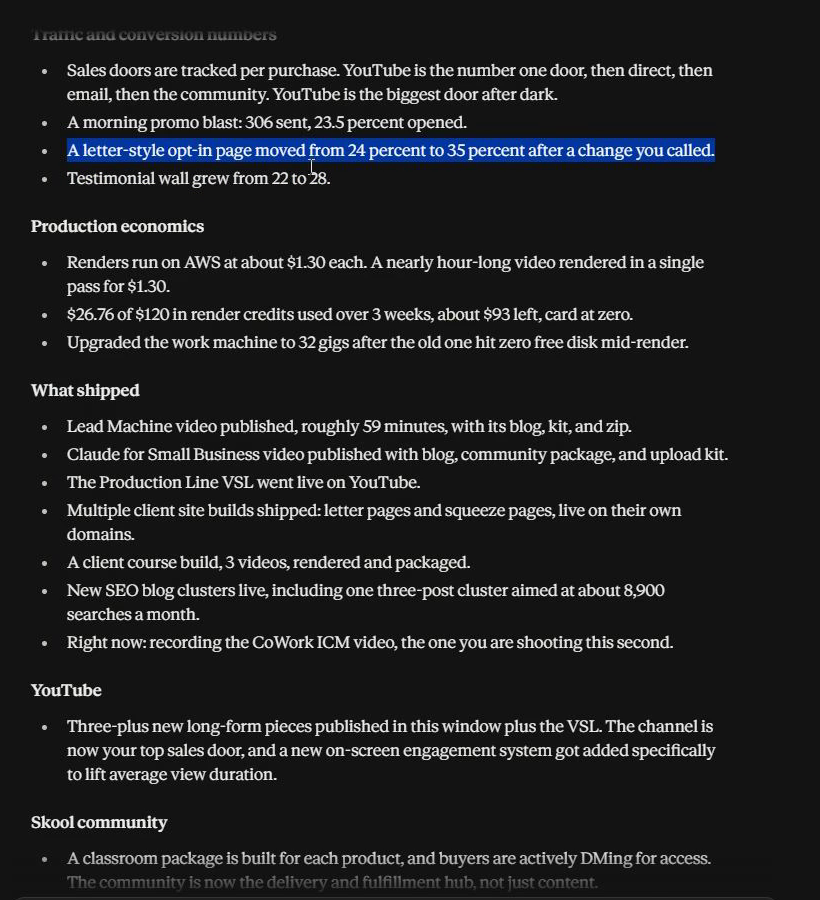
Every number on that screen came from the handoff file. A promo blast of 306 emails at 23.5 percent opened. An opt-in page that moved from 24 percent to 35 percent after a change I made. Renders on AWS at about $1.30 each. A testimonial wall that grew from 22 to 28. Cowork had no memory of any of it. Claude Code had written it down, and Cowork read the map to find it.
Cowork's memory of my business was a copy, and the copy went stale. The folder never did. If you have ever felt like the errand boy between your own AI tools, this is the cure. Neither tool carries anything. The folder does.
What Does Claude Code Build That Cowork Then Reads?
The folder itself, from 1 prompt. Here is the plan Claude Code wrote before it touched a file:
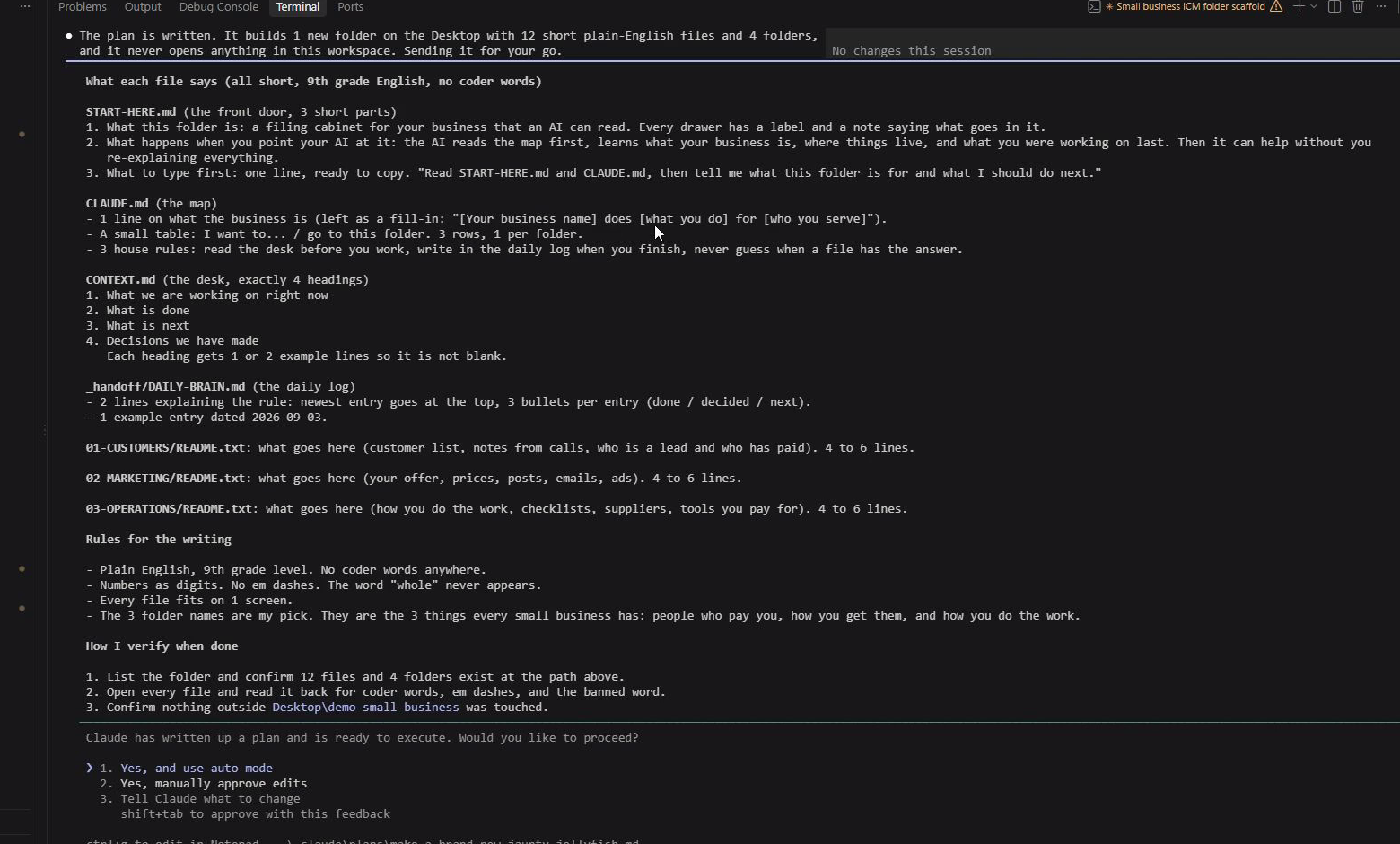
3 drawers and 4 files. Customers, marketing, operations. The map, the desk, the front door, the handoff. Every file short enough to fit on 1 screen, written at a 9th grade reading level, no developer words. I built it in a brand new empty folder on my desktop, away from my real business, and the prompt said so out loud. Then I pushed it to a browser and pointed a fresh AI at it. It answered from the map.
The rule that keeps the shared brain from rotting is the 3 bullet rule. When I started, my AI wrote books into the handoff file. Pages of it. The file bloated, the AI got confused, and the map drifted. Now every entry is 3 bullets. Done, decided, next. Newest on top. That 1 rule is why the folder still works.
Should You Use Cowork or Claude Code?
Both, on 1 folder. Use Claude Code to build and to write the handoff. Use Cowork to read, to catch up, and to do the desk work that never needed a terminal. Give both the same folder, put the 1 line in Cowork's box, and stop being the messenger between them.
If you want the folder from the video, it is free inside the Build Market Close community, and the written guide I made Carlos walks the 4 files 1 at a time. If your business is not filed yet, start with organizing your business for AI and come back to this when the map exists.
The mute is in the video. My laptop choking is in the video. Cowork answering 2 weeks behind is in the video. It all stayed in, because that is what connecting the 2 doors actually looks like the first time.